
You know you should post every day.
But every day you sit down, stare at a blank screen and think, what do I even post today?
Twenty minutes later you've posted nothing, or something rushed that nobody likes.
There's a better way. Plan the whole month in one sitting. Here's a simple 60 minute plan that works for any small business, and how CampaignBuilders can do most of the work for you.
Why Planning a Month at Once Works
You stop deciding every day. Making one big plan is much easier than making thirty small decisions.
Your posts work together. A plan lets you build up to a launch or a sale instead of posting random things.
You post consistently. Social platforms reward accounts that show up regularly.
It's faster. Writing ten posts in one go is quicker than writing one post ten times, because your brain stays in the same mode.
It frees your head. When the month is planned, you stop carrying that "I should post something" worry around all day. You can focus on customers, knowing your social media is already handled.
What You Need Before You Start
- One clear goal for the month. More bookings, more followers, more sales of one product.
- A list of your key dates. Launches, offers, events and holidays that matter to your customers.
- Your best photos and videos. Even phone pictures are fine.
- A calendar. A spreadsheet, a notebook or an app.
- A timer set for 60 minutes.
The 60 Minute Plan
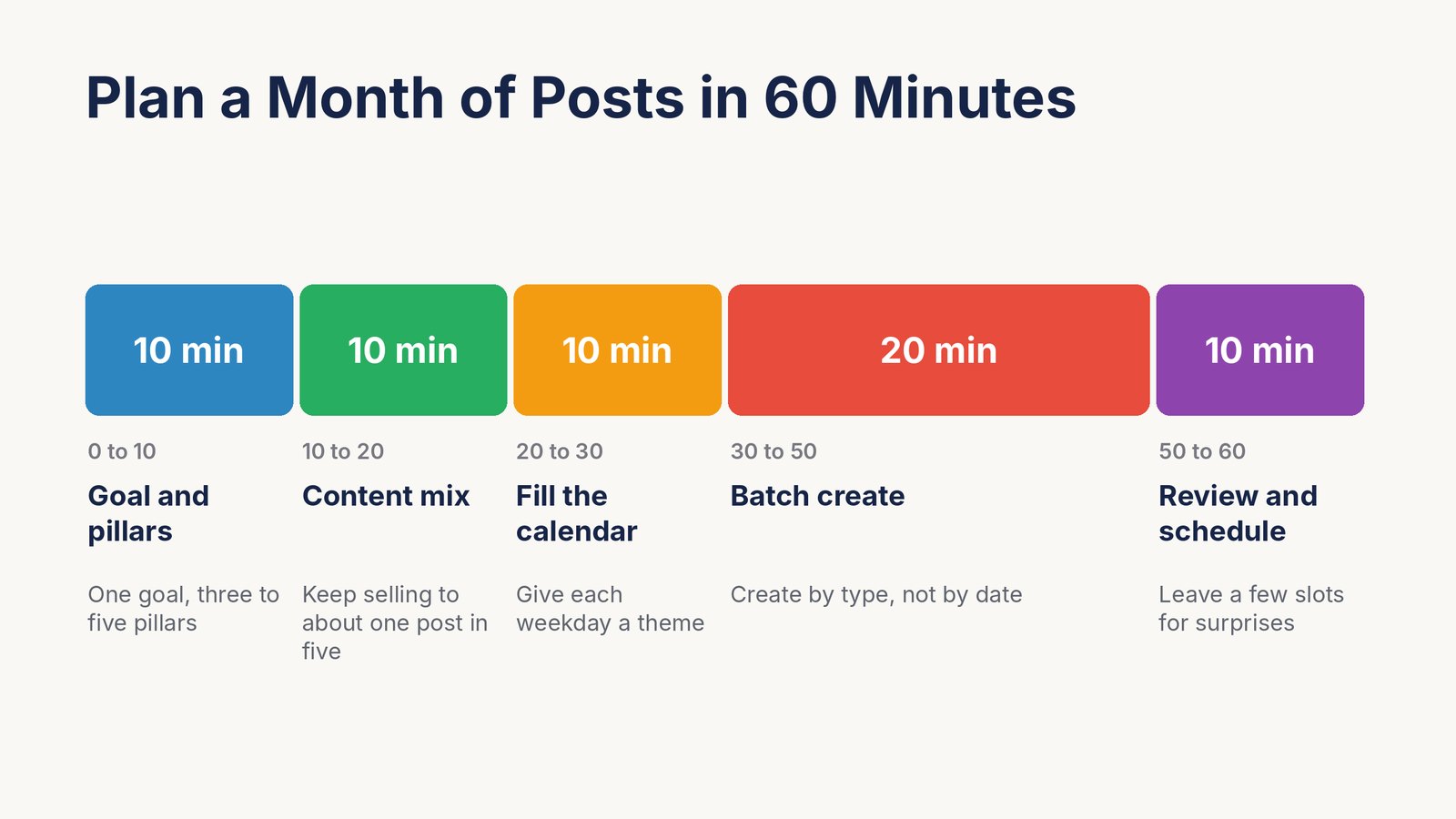
Here's how the hour breaks down. Stick to the times and don't polish too early.
Minutes 0 to 10. Set the Goal and Your Content Pillars
Write down your one goal for the month. Just one.
Then pick three to five content pillars. These are the topics you'll post about again and again. For a local bakery, that might be fresh bakes, behind the scenes, customer stories, tips and offers.
Every post you plan should fit one pillar. That keeps your feed focused and makes ideas easy to find.
Minutes 10 to 20. Choose Your Content Mix
Most people make one big mistake here. They post offers every day.
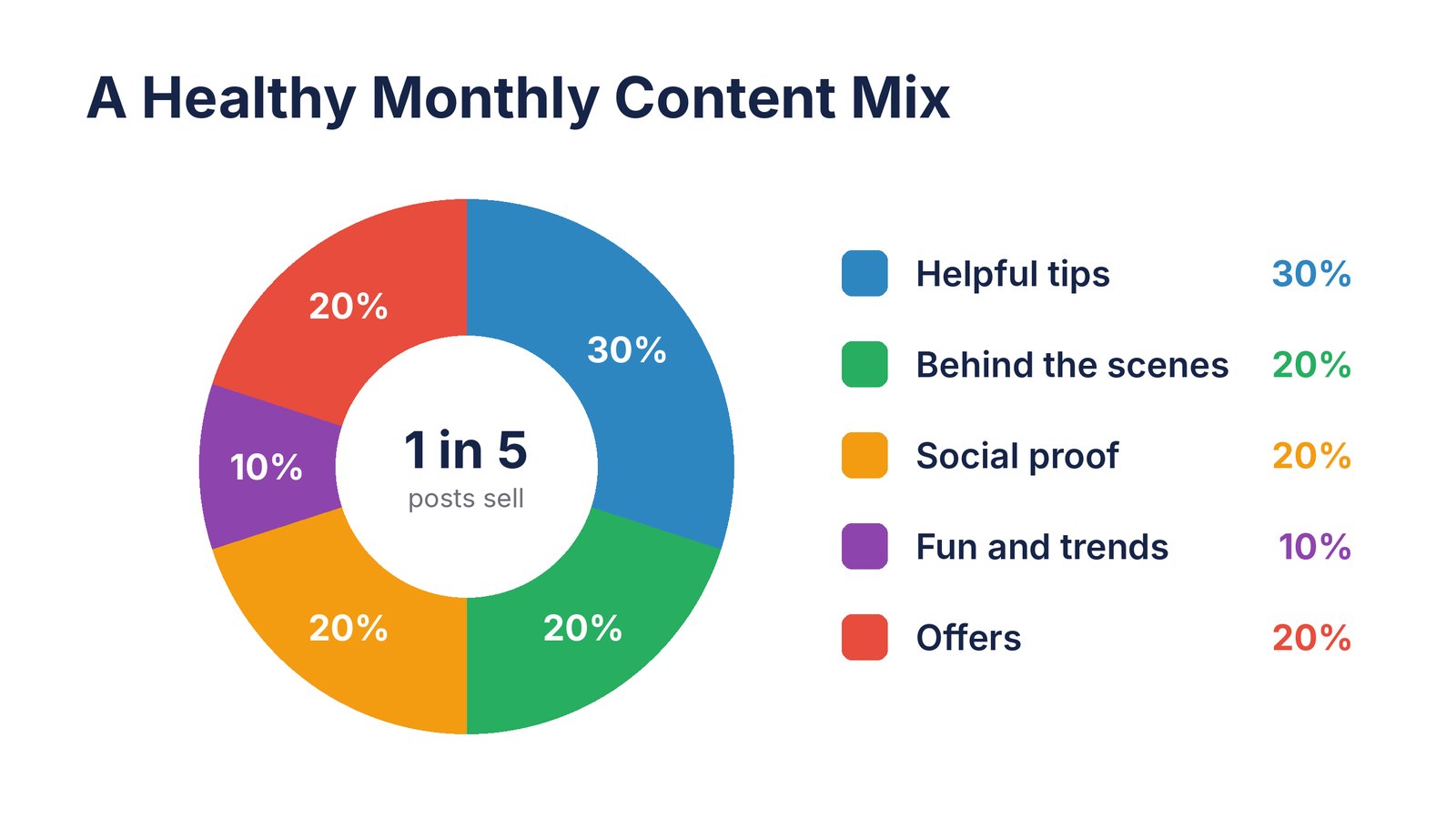
People follow you for value, not ads. A good rule is to keep selling to about one post in five.
- Helpful tips that solve a small problem. About 30% of posts.
- Behind the scenes of your business and your team. About 20%.
- Social proof like reviews, results and customer photos. About 20%.
- Fun and trends like memes, questions and news in your niche. About 10%.
- Offers and calls to action. About 20%.
Treat these as a guide, not a law. If your audience loves tips, give them more tips.
And mix your formats too. Some photos, some short videos, some text posts and the odd carousel. Variety keeps your feed interesting and shows you which formats your followers like best.
Minutes 20 to 30. Fill in the Calendar
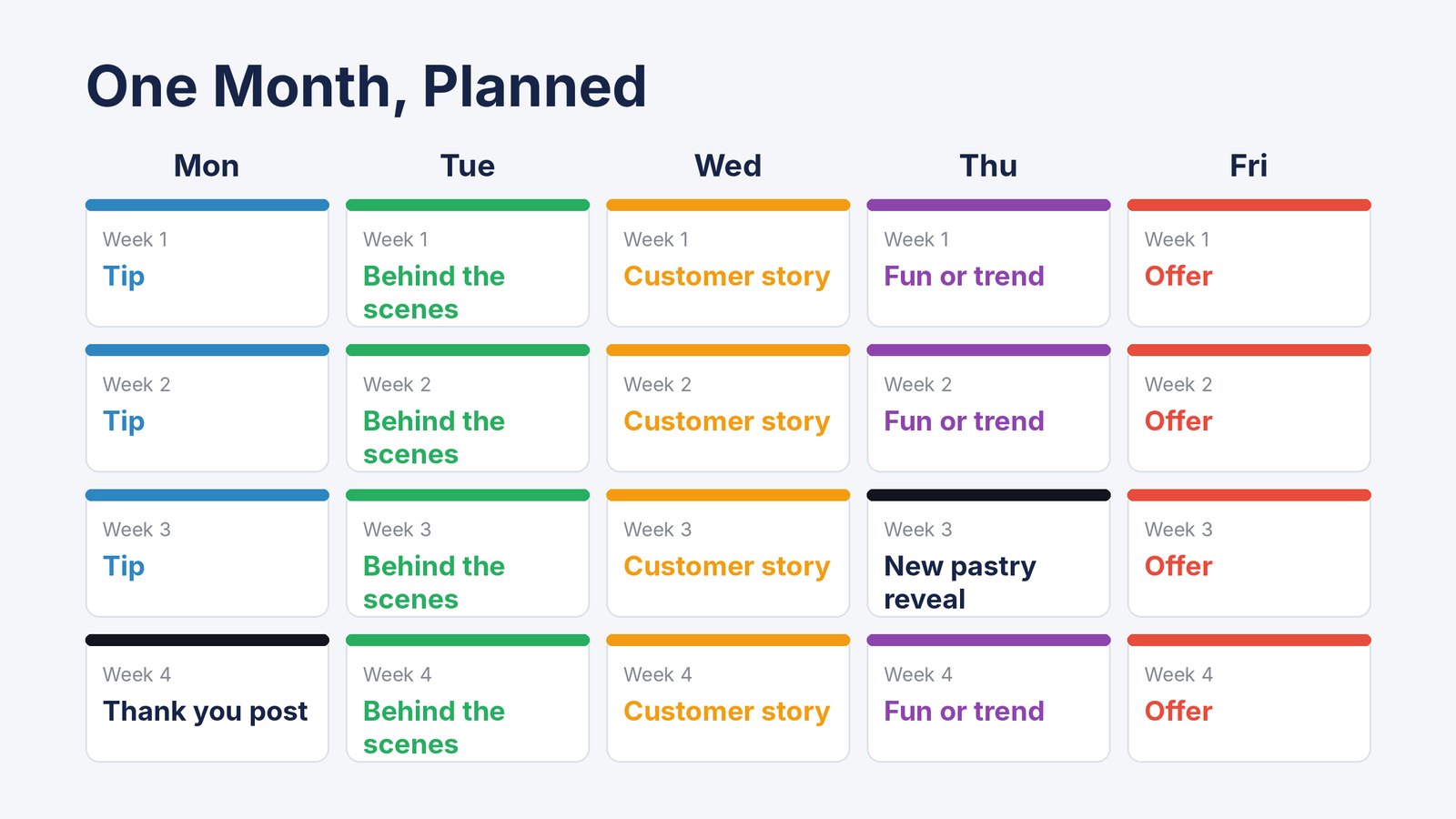
Now give each weekday a theme. This one trick makes planning almost automatic.
Monday tips. Tuesday behind the scenes. Wednesday a customer story. Thursday fun. Friday offer.
Then drop your key dates on top. A launch on the 15th? Plan a teaser on the 12th and a reminder on the 17th.
Decide how often you'll post on each platform. Five times a week on Instagram and Facebook is plenty for most small businesses. Two or three times on LinkedIn works well.
Minutes 30 to 50. Batch Create the Posts
This is the big block. Create by type, not by date.
Write all four tip posts in a row. Then all the customer stories. Then pick the photos. Working in batches keeps you fast because you're not switching gears every few minutes.
Keep each post simple. One idea, one image or video, and one clear next step, like "Book your table" or "Comment your favourite".
Twenty minutes isn't enough to make thirty polished posts by hand. That's exactly where an AI marketing team helps. More on that below.
Minutes 50 to 60. Review, Approve and Schedule
Read through the whole month at once. Does it sound like you? Is there too much selling? Any dates you missed?
Fix what needs fixing, then schedule everything. Most platforms have a free scheduler built in, or you can post from one app.
Done. A full month, in one hour.
One small tip before you close the laptop. Leave two or three empty slots each week for things you can't plan, like a happy customer's photo, a local event or a trend everyone is talking about. A plan should guide you, not trap you.
A Sample Month for a Local Bakery
Here's what one month might look like for a small bakery that wants more weekend orders.
Goal. 20% more weekend pre-orders. Pillars. Fresh bakes, behind the scenes, customer love, baking tips and offers.
Week 1. Build attention. Monday, a tip on keeping bread fresh. Tuesday, a 15 second video of the 5 am bake. Wednesday, a review from a regular. Thursday, a "croissant or cinnamon roll?" poll. Friday, a reminder that weekend pre-orders are open.
Week 2. Show the people. Meet the baker. A customer's birthday cake photo. A meme about waiting for bread to cool. A quick tip on reheating pastries. A Friday pre-order post.
Week 3. Launch something. Tease a new seasonal pastry on Monday and Wednesday, reveal it on Thursday and offer it for weekend pre-order on Friday.
Week 4. Prove it. Share the first reviews of the new pastry, a behind-the-scenes look at the busiest Saturday, a thank-you post to customers and a last-chance offer.
That's 20 posts, every one with a purpose, and all of it planned in one sitting.
Repurpose Each Idea Across Platforms
You don't need 20 ideas for every platform. You need 20 ideas, shaped a little differently for each one.
A tip about keeping bread fresh can be a 20 second video for TikTok and Reels, a photo with a short caption on Facebook, and a slightly longer, more business-like post on LinkedIn about reducing food waste.
One idea, three or four posts. Your month fills up much faster.
How CampaignBuilders Does the Heavy Lifting

Doing all this by hand works. But the creation part still takes the longest.
That's why we built CampaignBuilders. It's an AI marketing team, not a single chatbot. Specialist AI agents for strategy, writing and design work together on your campaign, just like a real marketing department.
Here's how it fits the 60 minute plan.
- Put in your business details. Tell it about your business, your audience and your goal for the month. This replaces most of the first ten minutes.
- Deploy your AI team. Pick agents with the skills, voice and industry knowledge you need, and set your brand guidelines.
- Watch them plan and create. The agents brainstorm angles, split the work and produce ready-to-post content. Posts, graphics, memes, news-style updates and even full videos.
- Review on your phone. Scan your campaign's QR code to open the mobile app. Finished posts arrive on your phone, and you approve and publish them with a tap.
- Give feedback like you would to a person. Too formal? More humor? Just tell them. The team has long-term memory, so it remembers your preferences next time.
It creates content for TikTok, Instagram Reels, YouTube Shorts, Facebook, LinkedIn and X.
So instead of spending 20 minutes trying to write 30 posts, you spend that time reviewing what your AI team already made.
CampaignBuilders costs just $5.58 a month, paid yearly ($67 a year), or $6.99 month to month. There's a 30 day refund guarantee.
That's less than most freelancers charge for a single day of social media work. Want to compare it with other tools? See our list of the best AI social media agents.
How to Check What Worked
At the end of the month, spend ten more minutes looking back before you plan the next one.
- Which posts got the most comments and shares? Make more like them.
- Which pillar performed best? Give it a bigger slice next month.
- Which days and times did best? Shift your schedule toward them.
- Did you hit your goal? If not, was it the offer, or did not enough people see it?
Each month gets a little better than the last. That's how small accounts grow steadily without burning out.
30 Post Ideas to Fill Your Month
Stuck for ideas? Pick from this list.
- Tips. A common mistake customers make. A quick how-to. A myth you can bust. Your favourite tool. A beginner question answered.
- Behind the scenes. How you make your product. A day in your life. Meet the team. Your workspace. What happens when an order comes in.
- Social proof. A customer review. A before and after. A customer photo. A big number, like orders shipped. A thank-you to a loyal customer.
- Fun and trends. A meme about your industry. This or that poll. Caption this photo. A throwback picture. A trending sound with your twist.
- Offers. A limited-time deal. A new product reveal. A bundle. A free guide. A last-chance reminder.
- Community. Ask a question. Share a local event. Feature another small business. Celebrate a milestone. Answer a comment in a post.
How to Write Posts People Stop For
A plan only works if the posts get noticed. These simple habits help every post do its job.
Lead with the hook. The first line or the first second of video decides everything. Start with a question, a surprising fact or a clear benefit.
Show real people and real work. Photos of your actual team, shop and customers beat stock images almost every time.
Keep captions short. Say one thing well. If you need more words, save them for LinkedIn or your blog.
Ask for one action. Comment, save, share, book or buy. Pick one per post, not all five.
Use your own voice. Write the way you talk to customers in your shop. Friendly and simple wins.
Add captions to videos. Most people scroll with the sound off.
Common Mistakes to Avoid
- Selling in every post. People scroll past ads. Give value first.
- Posting the same thing everywhere. Change the length and style for each platform.
- Planning and then forgetting. Check your results once a week and adjust.
- Polishing too much. A good post today beats a perfect post next month.
- Ignoring comments. Social media is a conversation. Reply within a day.
Frequently Asked Questions
How many posts should a small business make each month?
About 12 to 20 per platform is a good start. That's three to five a week. Consistency matters more than volume.
What is a content pillar?
A topic you post about regularly, like tips, behind the scenes or customer stories. Three to five pillars keep your feed focused and make ideas easy.
Can AI really create my social media posts?
Yes. Tools like CampaignBuilders create posts, graphics and videos from your business details. You should still review them so they sound like you.
Should I post the same content on every platform?
Share the same ideas, but adjust the format. Short and visual for Instagram and TikTok. A bit more detail and a professional tone for LinkedIn.
How far ahead should I plan?
A month is the sweet spot. Long enough to stay consistent, short enough to react to news and trends.
What if I miss a day?
Nothing breaks. Skip it and carry on with the plan. A missed day hurts far less than giving up on posting for a whole week.
Do I need to post on every platform?
No. Two platforms done well beat five done badly. Start where your customers already spend their time, then add more once your monthly routine feels easy.
Final Thoughts
You don't need more time to post every day. You need one good hour each month.
Set a goal. Pick your pillars. Give each day a theme. Create in batches. Review and schedule.
And if you want an AI marketing team to create the posts for you while you run your business, try CampaignBuilders for just $5.58 a month, paid yearly.